


Quick answer: If a Tanzanian employer asks whether you can use Excel, a course certificate alone may not answer the question. Build three small, fictional-data work samples: a stock-control tracker, a sales reconciliation report and an attendance dashboard. For each, show the business question, a clean workbook, the formulas you used, a quality check and a short explanation of your result. This is a practical way for graduates, administrators, accountants, storekeepers and career changers to demonstrate real capability without exposing an employer's confidential information.
Why an Excel portfolio is more convincing than a skills list
“Microsoft Excel: excellent” appears on many CVs, but it tells a hiring manager very little about what the applicant can actually do. A procurement assistant might need to identify delayed orders. A storekeeper might need to flag low stock. An HR assistant might need to reconcile attendance records before payroll preparation. The same spreadsheet application supports different decisions, and the evidence should reflect the work you want.
An Excel portfolio is not a colourful collection of screenshots. It is a small, reproducible set of business tasks with clear inputs, formulas, outputs and checks. It should demonstrate that you can receive imperfect information, structure it sensibly, answer a useful question and explain limitations. A well-documented beginner workbook can be more credible than an elaborate dashboard whose calculations you cannot defend.
The HumanValue Workplace Excel Essentials in Tanzania course is a relevant preparation option. The live catalogue describes formulas, sorting, filtering, reports, charts and downloadable practice materials. At the 21 October 2026 review, the course page displayed TZS 20,000. Check the live checkout before paying because prices and access conditions can change.
Start with a role, not a template
Read three recent vacancies in the same occupation family and underline their recurring tasks. For an office administrator, these may include maintaining records, preparing weekly summaries and tracking expenditure. For a warehouse assistant, they may include stock receipts, issues, reorder levels and cycle counts. For an accounts assistant, the focus may be payment schedules, reconciliations and error investigation.
Select projects that correspond to at least two of those tasks. A candidate applying for a logistics role does not need to show a complex finance model; a reliable stock movement workbook may be much more relevant. Write a one-sentence brief before opening Excel: “The supervisor needs to know which items require replenishment before Friday.” This anchors the project in a decision rather than a software feature.
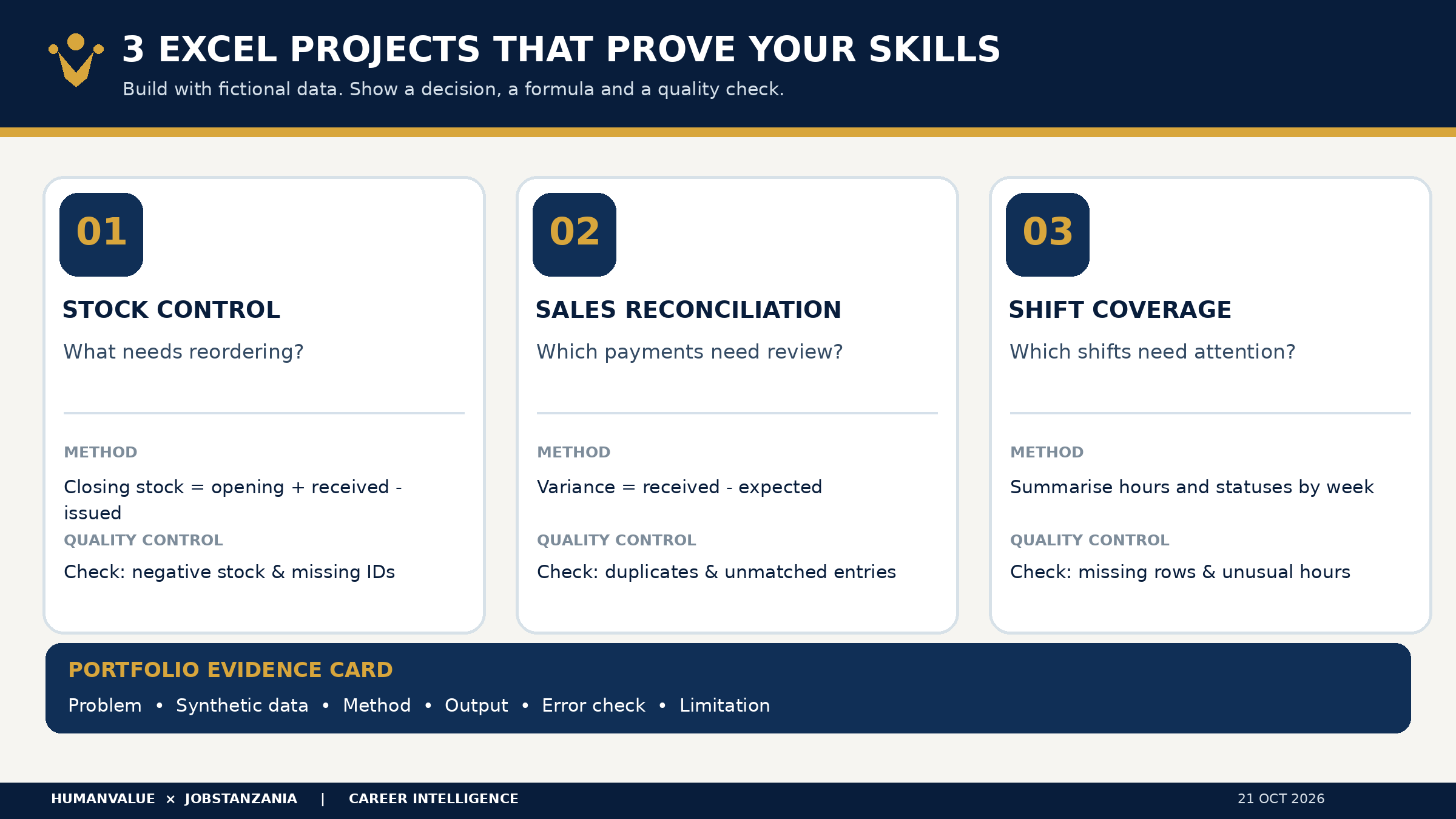
Project 1: Stock control and reorder alerts
Scenario: A fictional small distributor in Dar es Salaam manages 35 products. The supervisor needs to know opening stock, received units, issued units, closing stock and items below a reorder threshold. Create a sheet with Product ID, Item, Opening Qty, Received Qty, Issued Qty, Closing Qty, Reorder Level and Status. Enter made-up product names and quantities; label the dataset “synthetic demonstration data.”
In a simple row-based workbook, Closing Qty can be =C2+D2-E2, while Status can be =IF(F2<G2,"REORDER","OK"). Adapt cell references to your layout. Apply data validation so quantities are non-negative numbers. Add conditional formatting for “REORDER,” and use a filter to show the priority list. For a summary, calculate total units on hand and count items requiring replenishment using COUNTIF.
The quality test: Create a deliberate mistake where issued units exceed available stock. Does the workbook flag an impossible negative balance, or does it quietly present the result as real inventory? Add an exception column or an error check such as =IF(F2<0,"CHECK MOVEMENT",""). A recruiter may value this control more than an attractive chart.
What to present: One workbook, a one-page summary and a 45-second explanation: “I built a simple inventory control tool, highlighted seven fictional products below threshold and added a negative-stock exception check.” The seven products are part of your fabricated exercise, not a claim about a real business.
Project 2: Sales and cash reconciliation
Scenario: A fictional retail counter records daily sales across cash and mobile-money channels. Your task is to compare sales totals with recorded collections and identify variances for review. Use columns for Date, Transaction ID, Channel, Expected Amount, Received Amount, Variance and Investigation Status. Make all names and transactions synthetic.
Calculate =E2-D2 for a signed variance. Create a daily summary with SUMIF or SUMIFS, depending on your layout. Add a pivot table to summarise expected and received amounts by payment channel. Microsoft’s PivotTable filtering guidance explains how users can filter reports to investigate a subset of records.
Do not mark every difference as fraud or theft. A discrepancy may arise from timing, a duplicated row, a mistaken amount or a missing receipt. The workbook should distinguish “unreconciled” from “confirmed error.” Build a short investigation note for three synthetic exceptions, including the next check and who should approve any adjustment.
The quality test: Check for duplicate Transaction IDs, blank dates and text values in amount fields. Reconcile the grand totals to your original fictional source table. A recruiter should be able to follow how you arrived at each number.
What to present: A pivot table, a simple variance chart and a short decision note: “Two transactions need source-document review before the daily report can be signed off.” This demonstrates judgement as well as Excel operation.
Project 3: Attendance and shift coverage
Scenario: A fictional service company needs to understand which shifts are covered and which attendance records need clarification. Create Employee Code, Department, Scheduled Date, Shift, Planned Hours, Recorded Hours, Status and Supervisor Review. Use invented codes, not actual employee names or payroll identifiers.
Use a consistent dropdown for statuses such as Present, Absent, Approved Leave and Pending Review. Build a pivot table by department and week. Calculate planned versus recorded hours, but do not turn a spreadsheet calculation into an automatic payroll or disciplinary decision. Leave and attendance classifications require approved policies and human review. Your portfolio is demonstrating reporting, not legal interpretation.
Add a data-quality tab listing missing entries, duplicate dates and impossible hours. Create a manager-facing chart showing uncovered shifts, with a footnote explaining that the figures are hypothetical. If you use a sample 40-hour week, state that it is an illustration rather than a legal standard for every employer or role.
What to present: A single-page shift coverage report, an exception log and a note on data protection. The Tanzanian Personal Data Protection Commission explains that the Personal Data Protection Act governs the collection and processing of personal data. Your public portfolio should never contain real employee attendance, phone numbers, medical information or salary details without an appropriate lawful basis and authorisation.
Package each project as an evidence card
Every project should fit on one evidence card with six fields: business problem, data source, Excel features, result, quality check and limitation. For example: “Problem: weekly stockouts were hard to identify. Data: 35 fictional product records. Method: calculated balances, IF flags and filters. Output: reorder list. Quality check: negative-stock warning. Limitation: does not predict supplier lead time.”
This makes your portfolio easier to review in an interview and protects against the temptation to exaggerate. Do not claim you reduced real stockouts by 25% when the exercise uses invented data. Instead say you designed a method that could support replenishment decisions and would require real-world validation before deployment.
Keep the master files editable. Export a PDF summary for quick review, but preserve formulas in the workbook. Name files clearly, such as Excel_Portfolio_Stock_Control_Demo.xlsx. Include a short README that says the information is simulated, the work is your own and no company systems were accessed. Remove hidden sheets and document metadata that might reveal confidential material.
How to mention the portfolio on your CV and LinkedIn
A weak CV line says “Advanced Excel.” A stronger, accurate line says: “Created three Excel demonstration workbooks for inventory control, sales reconciliation and shift coverage, using IF, SUMIFS, filters, PivotTables and exception checks.” If you are still learning, use “practical working knowledge” instead of “expert.” Explain exactly what you can do without assistance.
On LinkedIn, feature a short PDF of the evidence cards rather than uploading a spreadsheet with personal data. In an interview, invite the recruiter to choose one project and ask how it works. Be ready to explain why a formula is correct, where it could fail and what you would do if the source data were incomplete.
The CV & Application Pack Lab can help you connect this evidence to a particular vacancy, while the HumanValue Learning Center provides a broader course catalogue. Learning resources support readiness; neither course enrollment nor a portfolio guarantees a shortlist or job offer.
A realistic seven-day build plan
On day one, select a role and draft the three business questions. On days two and three, build and test the stock workbook. On day four, complete the reconciliation report. On day five, build the attendance dashboard. On day six, deliberately introduce errors, test every formula and remove sensitive information. On day seven, prepare the three evidence cards and rehearse a two-minute demonstration.
If you have only one hour a day, finish one excellent project rather than three unfinished ones. Employers value reliable work, and a modest portfolio that you understand can create a better interview conversation than an inflated list of tools.
Frequently asked questions
Do I need a paid Excel certificate before applying for office jobs?
Not necessarily. Follow each vacancy's requirements. A relevant course can help build capability, but a transparent work sample shows what you can do. Some employers require specific qualifications or experience independently of software skills.
Can I use Excel files from my current employer?
Only if you have appropriate authorisation and a lawful basis for sharing. The safer default is to recreate the workflow with synthetic data and remove all confidential business or personal information.
Is a PivotTable mandatory for an entry-level portfolio?
No. Use it when it helps answer the question. Clean tables, correct formulas, data validation and understandable summaries are often the stronger starting point.
Will these three projects get me hired?
No portfolio guarantees an interview or employment. The aim is to make relevant skills easier for a recruiter to assess and to identify gaps you can improve.
Your next practical step
Choose one target vacancy, build the stock-control workbook using fictional data, and write its evidence card. If you need guided practice, review Workplace Excel Essentials in Tanzania. When your work is ready, tailor your CV to the actual role rather than presenting the same portfolio to every employer.
Editorial research reviewed 21 October 2026. Product availability and fees should be reconfirmed at checkout. Examples are fictional; this article does not report hiring outcomes.